Guide
How to Job Cost a Remodel Without Spreadsheets
A simple way to job cost a kitchen or bath remodel: set a budget by category, log costs weekly, and catch overruns while you can still fix them.
Most remodelers can tell you what they bid a kitchen for. Far fewer can tell you, halfway through, whether that kitchen is still on track to make money. That's what job costing is for: knowing where the money is going while you can still do something about it.
You don't need a 40-tab spreadsheet. You need a budget, a habit, and a weekly 15-minute check.
What job costing means
Job costing is assigning every cost to the job it belongs to so you can see that job's real profit [2]. For a remodel, the costs fall into a few buckets [1][2]:
- Materials: cabinets, tile, fixtures, drywall, fasteners
- Labor: your crew's hours, at the loaded rate
- Subs: plumber, electrician, countertop installer
- Other direct costs: permits, dumpster, dump fees, rentals
Use the loaded labor rate, not the wage. Loaded means wage plus payroll taxes, workers' comp, benefits, and paid time off [1][2]. Across the construction industry, the Bureau of Labor Statistics found benefits made up 30.5% of employer compensation costs in June 2026 [4]. That's why a crew hour costs more than the number on the paycheck.
Step 1: Turn your estimate into a budget
Your estimate already has the numbers. Split it into the same buckets you'll track against. Scaftra recommends a budget that mirrors your estimate, with enough detail to track the costs that actually move [3]. For most remodels, the four buckets above are plenty. If cabinets or tile are a big share, give them their own line.
Step 2: Log costs as they happen

- Every receipt gets the job number [1].
- Crew hours get logged by job the day they're worked, not from memory at the end of the month [3].
- When you sign a sub or order cabinets, note the amount against the job right away. Scaftra calls these "committed costs": money already promised even if the invoice hasn't come [3].
Step 3: Check budget vs. actual every week
This is where the value is. Toran Accounting recommends weekly budget-versus-actual reviews to catch labor overruns, material price changes, sub overages, and scope creep without approved change orders before they grow [2]. For each open job, compare what's been spent to the budget, bucket by bucket. For anything over, ask: was this a change the homeowner asked for (change order), or a miss on our side?
Toran also recommends updating cost-to-complete estimates regularly [2]: what's spent so far plus what's left to spend. Scaftra adds that you should record committed costs as soon as you issue a PO or sign a sub, so the report shows what's already promised [3]. If spent plus committed plus remaining adds up to more than the budget, you have an overrun in progress, and you still have options.
Step 4: Close it out and learn
When the job's done, compare the estimate to the actual for each bucket [3]. Knowify points out that this history is what makes your next budget better [5]. If labor ran 20% over on your last three bathrooms, your next bathroom bid should know that.
Example: a kitchen remodel, weekly check
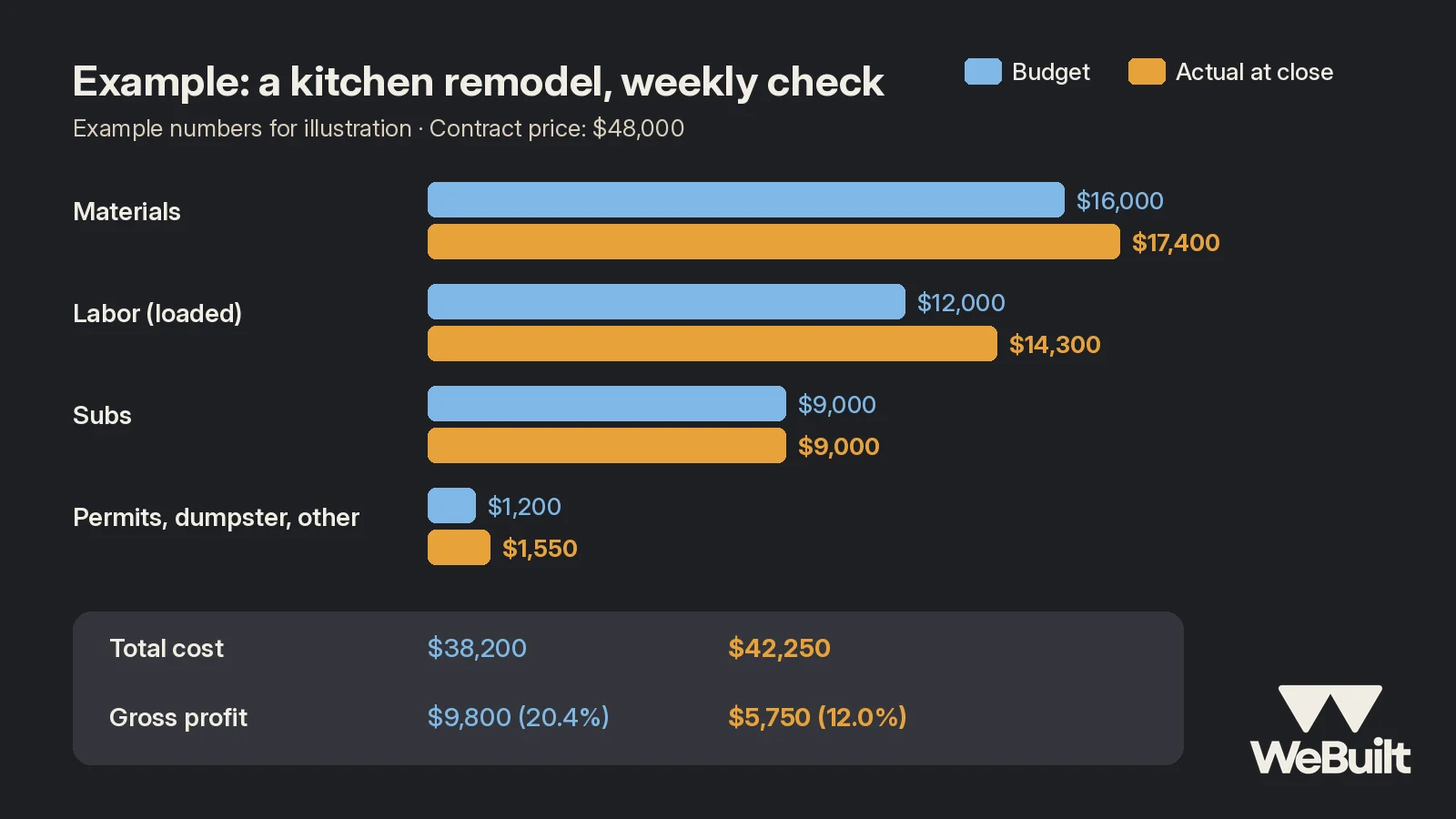
Example numbers for illustration:
Contract price: $48,000
| Bucket | Budget | Actual at close |
|---|---|---|
| Materials | $16,000 | $17,400 |
| Labor (loaded) | $12,000 | $14,300 |
| Subs | $9,000 | $9,000 |
| Permits, dumpster, other | $1,200 | $1,550 |
| Total cost | $38,200 | $42,250 |
| Gross profit | $9,800 (20.4%) | $5,750 (12.0%) |
The job lost about 8 points of margin. Where did it go?
- Labor, +$2,300. Water damage behind the sink wall added two days. That was a real change and should have been a change order.
- Materials, +$1,400. The homeowner upgraded the faucet and pulls mid-job, with no paperwork.
- Other, +$350. A second dumpster haul.
If this crew had looked at the numbers in week two, the water damage and the upgrades could have become signed change orders worth most of that $4,050.
What to do when a bucket runs over
When your weekly check shows a category over budget, work through it in this order:
- Is it a change? If the homeowner asked for it, or you found a hidden condition, write the change order now, while the homeowner can still see the work.
- Is it a timing issue? Sometimes a big invoice just came in early. Check the cost to complete before you panic [2].
- Is it a miss? If the crew is simply running slow, talk about it now. Can the remaining work be sequenced better? Is the right crew on it?
- Write it down for next time. Note why it ran over so the next estimate for this kind of job carries the right number.
The goal isn't to blame anyone. It's to find out while there's still time to change the outcome.
Why spreadsheets break down
Spreadsheets work until they don't. Someone forgets to update one, a formula gets overwritten, and there's one copy on one laptop. Estimate.Pro's list of common leaks includes a 3-day equipment rental that ran 5 days while nobody updated the job costing [1]. The math is rarely the problem. Keeping it current is.
WeBuilt replaces the spreadsheet: log costs and hours against a job from your phone, and it shows the job's profit as you go. See what it does today.
FAQ
How often should I check job costs on a remodel?
Weekly. Weekly budget-versus-actual reviews catch overruns before they grow [2], while there's still time to fix them [3].
Should I use the wage or the loaded rate for labor?
The loaded rate: wage plus taxes, comp, benefits, and paid time off [1][2].
What's the most common reason remodels lose margin?
Every job is different, but a common pattern is extra work that never becomes a change order. Weekly checks catch it while you can still write one.
How WeBuilt helps
The weekly budget-versus-actual check in this post is exactly what WeBuilt is built for. Instead of keeping a spreadsheet up to date, you set up the remodel's budget from your estimate and log costs to the job as they come in: materials, crew hours, subs, and the dumpster. Each week you can see which buckets are running over while you can still write the change order or fix the problem. When the kitchen is done, you see what the job really made and how it compared to the bid, so your next remodel estimate starts from real numbers. It won't write change orders for you, but it shows you when you need one.
Want to see it on your own jobs? Book a 15-minute walkthrough with Ian.
See it on a real job
Book a 15-minute walkthrough with Ian and bring a recent remodel. Founding 25 spots are open for Utah remodelers.
Sources
- Estimate.Pro, The Contractor's Guide to Job Costing (Without an Accountant). Accessed November 2, 2026.
- Toran Accounting, Construction Job Costing: Best Practices. Accessed November 2, 2026.
- Scaftra, The Complete Guide to Construction Job Costing for Trade Contractors. Accessed November 2, 2026.
- U.S. Bureau of Labor Statistics, Employer Costs for Employee Compensation, June 2026 (Table 4). Accessed November 2, 2026.
- Knowify, Mastering construction job costing: A contractor's guide. Accessed November 2, 2026.