Checklist
Put a Job Number on Every Receipt: The 10-Minute Bookkeeping Habit
The simplest bookkeeping habit for contractors: a job number on every receipt and every hour. Here's how to set it up and get your crew to stick with it.

Picture the glovebox of a contractor's truck in November. Faded receipts from three supply houses, a gas station, and a rental yard. Some are for the Smith bathroom, some for the Garcia deck, some for the shop. By the time anyone sorts them out, nobody remembers which is which.
That pile is why so many small contractors don't know which jobs make money. The fix isn't fancy software or an accountant. It's one habit: every receipt and every hour gets a job number.
Why the job number matters
Estimate.Pro puts it plainly: you don't need an accountant for job costing; you need costs tracked per job, with a job number on every receipt [1]. They say that habit gets you most of the value of a full accounting setup [1].
Without it, costs land in one big bucket. You can see the business spent $14,000 on materials last month, but not that $4,000 of it went to a job you priced at $9,000.
Step 1: Set up a simple numbering system

Keep it short enough to write on a receipt with a carpenter's pencil:
- Year + number: 26-014, 26-015, 26-016
- Give one number per job, including small ones and warranty callbacks
- Add a "SHOP" code for things that aren't for one job (tools, shop supplies, the office printer). Those are overhead.
Estimate.Pro suggests a sequential number per project, like JOB-2024-001 [1]. The exact format doesn't matter. Consistency does.
Step 2: Pick a few cost categories
Use a short list so the crew doesn't have to think [1]:
| Category | What goes in it |
|---|---|
| Materials | Lumber, fixtures, concrete, shingles, fasteners |
| Labor | Crew hours on that job |
| Subs | Electrician, plumber, drywall, any subcontractor |
| Permits & fees | Permits, inspections, dump fees |
| Equipment | Rentals, fuel for rented gear |
| Other | Anything else tied to that job |
Keep project costs in the job and true overhead out of it. Buildertrend's guest expert puts it this way: "Project-specific costs must be in your cost of goods sold" [4].
Step 3: Make it a crew habit

- Write it at the counter. Ask the cashier to put the job number in the PO or job name field. Or write it on the receipt before leaving.
- Snap a photo the same day. Paper fades and gets lost.
- Hours, too. Scaftra's guide says labor hours should be reported by project when they're worked, not rebuilt from memory at the end of the month [2].
- Tie costs when they're promised. When you issue a purchase order or sign a sub, note it against the job right away, before the invoice shows up [2]. That way you know what's already committed.
Step 4: Enter it within a week
Scaftra's point about timing is the important one: a cost that isn't recorded until month-end can't help you make a decision mid-month [2]. Pick a weekly time (Friday afternoon works for many crews) to enter or upload every receipt and timecard.
Example: one missing week
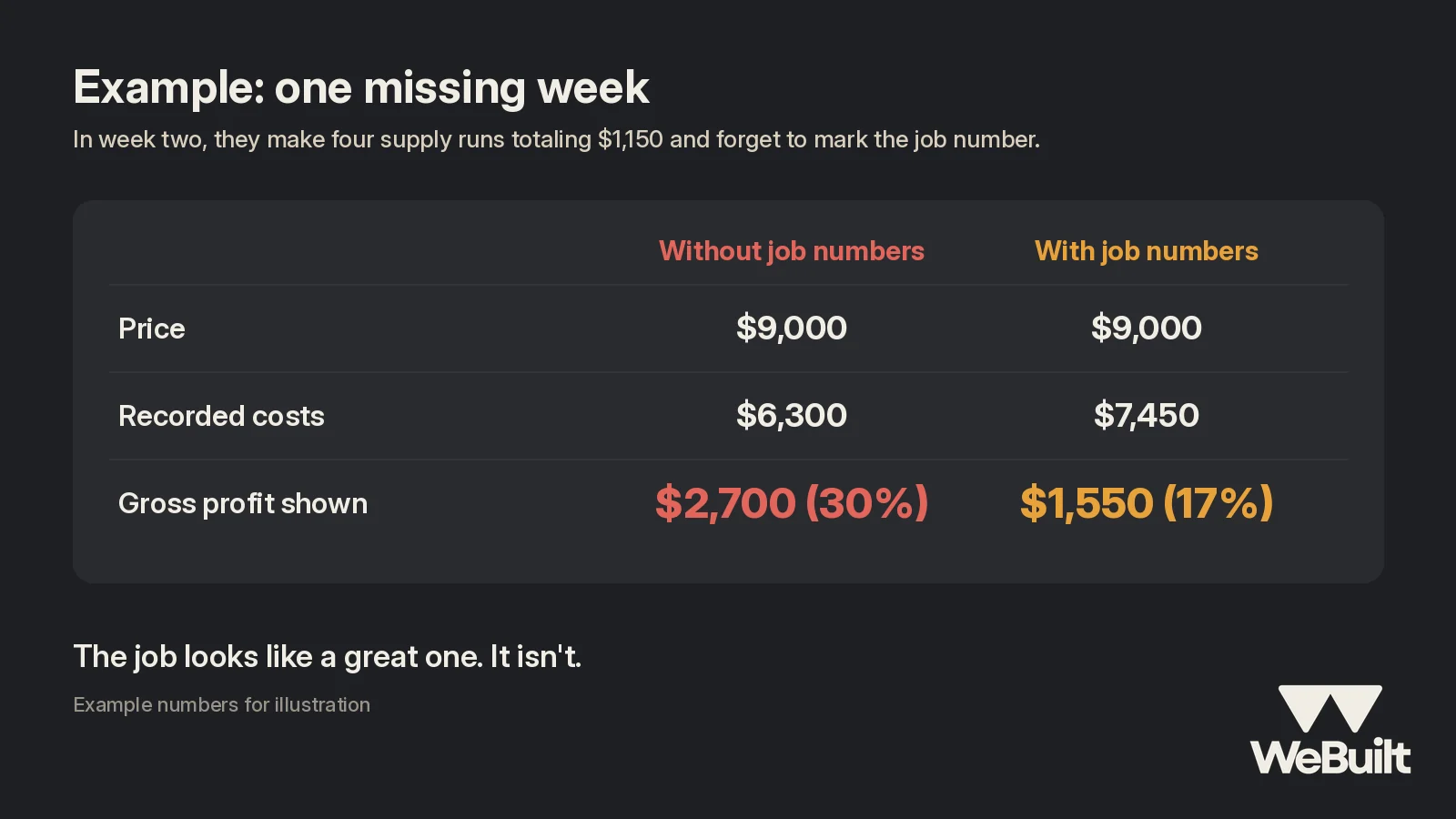
Example numbers for illustration:
A two-person crew runs a $9,000 bathroom job. In week two, they make four supply runs totaling $1,150 and forget to mark the job number. Those receipts get booked as "shop supplies."
| Without job numbers | With job numbers | |
|---|---|---|
| Price | $9,000 | $9,000 |
| Recorded costs | $6,300 | $7,450 |
| Gross profit shown | $2,700 (30%) | $1,550 (17%) |
The job looks like a great one. It isn't. And the next bathroom gets bid the same way.
A 10-minute Friday routine
Here's a simple weekly checklist any small crew can run:
- Empty the trucks. Collect every paper receipt from gloveboxes, clipboards, and pockets.
- Check for job numbers. Anything unmarked gets sorted now, while people still remember.
- Photograph or upload. Every receipt gets a picture, filed under its job.
- Check the hours. Make sure every crew hour for the week is tied to a job, including drive time to that job.
- Note what's promised. Write down any new purchase orders or sub agreements against their job [2].
- Glance at each open job. Is any category already past its budget? If so, find out why before Monday.
- Toss the shop items in SHOP. Tools and supplies that aren't for one job go to overhead.
It feels like overhead itself the first few weeks. Estimate.Pro says it takes about two weeks for the crew habit to stick and about a month before patterns show up in the numbers [1].
The payoff
Once costs are tied to jobs, you can finally answer the useful questions [1][3]:
- Which jobs, trades, or customers make the best margin
- Where estimates are consistently low
- Whether labor or materials is where you usually run over
Toran Accounting's list of what belongs in a job's cost (labor, labor burden, materials, subs, equipment, permits, and more) is a good check for anything you're still missing [3].
WeBuilt is built around this habit. Log costs and hours against a job and it shows the profit on that job as you go. See the platform.
FAQ
What if one receipt covers two jobs?
Split it. Write both job numbers and the amount for each, or split it when you enter it.
Do I need an accountant to start?
No. A job number on every receipt and a few categories gets you most of the value [1].
How often should we enter receipts?
At least weekly. Late costs can't help you catch a problem while the job is still running [2].
How WeBuilt helps
A job number on every receipt only pays off if those costs end up somewhere you can actually see them. WeBuilt gives every job its own place for costs, so the supply runs, sub costs, and crew hours you tie to a job show up against that job's estimate. Your Friday routine gets simpler: log the week's receipts to the right jobs, then check which ones are running ahead of budget while there's still time to do something about it. When a job wraps up, you can see what it really made, instead of finding out months later that "shop supplies" were hiding $1,000 of bathroom materials.
Want to see it on your own jobs? Book a 15-minute walkthrough with Ian.
Want to see it in action?
Book a 15-minute walkthrough with Ian. Founding 25 spots are open for Utah crews.
Sources
- Estimate.Pro, The Contractor's Guide to Job Costing (Without an Accountant). Accessed November 2, 2026.
- Scaftra, The Complete Guide to Construction Job Costing for Trade Contractors. Accessed November 2, 2026.
- Toran Accounting, Construction Job Costing: Best Practices. Accessed November 2, 2026.
- Buildertrend, How to Price Your Projects for Profitability. Accessed November 2, 2026.